Sky Exchange Desktop vs Mobile: Which Platform Performs Better?

Choosing between desktop and mobile access is not only about screen size. Speed, network quality, account security, navigation, privacy and device reliability can all change the experience. For Indian users researching Sky Exchange, the comparison also requires an important legal and safety check before any account activity.
This guide examines how desktop browsers and mobile devices differ in performance, login convenience, visibility, security and error handling. It also explains the risks connected with fake websites, unofficial APK files, shared devices and misleading account links. By the end, readers will know which option is technically more practical and why legal verification must come before registration, deposits or gaming activity.
What Desktop and Mobile Access Actually Mean
Desktop access generally means opening a platform through a browser on a laptop or computer. Chrome, Edge, Firefox and Safari are common choices. Nothing usually needs to be installed unless the service offers separate desktop software.
Mobile access can take two forms:
- Opening the website in a smartphone browser
- Installing a mobile application or APK file
The browser route is usually simpler because it does not require installation permissions. An app may offer faster access, but it creates an additional safety concern when the file is unavailable through a recognised app store.
People may also find the brand written as skyexchange, skyexch or sky exch. These spelling variations can make fake pages harder to recognise. A similar name, logo or login screen does not prove that a website or application is genuine.
Sky Exchange Desktop vs Mobile at a Glance
The better option depends on what the user is trying to review and the quality of the device being used.
| Comparison Point | Desktop or Laptop | Mobile Phone |
|---|---|---|
| Screen space | Better for viewing complete menus and account details | Smaller screen may require more scrolling |
| Portability | Limited to a fixed work area | Can be accessed from almost anywhere |
| URL checking | Full website address is easier to inspect | Mobile browsers may shorten or hide parts of the URL |
| Navigation | Mouse and keyboard provide precise control | Touch controls are faster but easier to tap incorrectly |
| Internet connection | Broadband may offer greater stability | Mobile data quality can change by location |
| Installation risk | Browser access usually needs no extra file | Unverified APK files may create security risks |
| Privacy | Risky on shared office or family computers | More private when the phone is personally controlled |
| Battery dependence | Usually connected to continuous power | Long sessions can drain the battery |
| Multitasking | Easier to compare support pages and account records | Switching between screens can be less convenient |
| Best technical use | Detailed account review and support communication | Quick, lawful account checks on a trusted device |
This table compares general device performance. It does not confirm that any particular Sky Exchange app, login page or betting service is authorised, lawful or safe.
Why Desktop Often Feels More Stable
A laptop or computer usually offers the clearest layout. Menus, notices, account settings and support information can appear together instead of being compressed into a narrow mobile format.
More Space for Account Information
The wider display makes it easier to examine:
- Account profile details
- Login history
- Security settings
- Terms and policies
- Support messages
- Transaction records, where legally available
This can be useful when a person needs to identify an incorrect balance entry, review an old account or collect information for a support complaint.
Easier Website Verification
A desktop browser normally displays more of the domain name. This helps users notice misspellings, strange extensions and extra words added to a fake web address.
Searches such as sky exchange login, skyexchange login, skyexch login or sky exchange login id may display unrelated pages, paid listings or imitation websites. Users should not assume that the first result is official.
Better for Extended Reading
Desktop access is more comfortable when checking privacy policies, legal notices, responsible-use information and customer-support conditions. These documents can be difficult to read on a small phone screen.
However, desktop access is not automatically safer. A shared computer may save browser history, cookies or passwords. Public computers should never be used for account access, OTP entry or financial information.
Where Mobile Access Has an Advantage
Mobile phones provide convenience. A user can check an account message or contact support without sitting in front of a computer.
Faster Access on a Personal Device
A personally controlled smartphone may be more private than a shared laptop. Screen locks, fingerprint access and device-level security can reduce casual access by other people.
Mobile devices are also convenient for receiving an OTP. The user does not need to move between a computer and phone during verification.
Better for Short Sessions
Mobile access suits brief tasks such as:
- Reading a support reply
- Reviewing an account notification
- Updating a password
- Checking whether an account has been closed
- Confirming that personal details have been removed
It is less suitable for reviewing several long pages, comparing detailed records or checking complex account information.
The APK Problem
Users searching for sky exchange app, skyexch app, skyexchange app or skyexchange betting app may encounter APK files shared through messages, social media groups or unfamiliar websites.
An APK can install software outside the standard app-store review process. A fake file may request access to SMS messages, contacts, storage, notifications or accessibility settings. CERT-In has repeatedly warned that fraudulent messages and applications can be used to steal passwords, banking information and OTPs.
A mobile browser is generally the lower-installation-risk option when no verified store listing exists. It still requires careful domain checking.
The Most Important India-Specific Check in 2026
Before deciding whether desktop or mobile performs better, Indian readers must first consider whether the activity itself is permitted.
The Promotion and Regulation of Online Gaming Act, 2025 came into force on 1 May 2026. Its definition of an online money game covers online games involving payment, deposits or stakes in expectation of monetary or similar gains, whether the game depends on skill, chance or both.
The Act prohibits offering online money gaming services, advertising them and facilitating payments for them. The prohibition applies across India and also covers services operated from outside India but offered within the country.
Therefore, Indian users should not treat searches such as sky exchange betting, sky exchange betting id, sky exchange cricket id, skyexchange online id or sky exchange new id 2026 as proof that the activity is legally available.
Desktop and mobile performance becomes secondary when the service involves prohibited online money gaming. Users should not create a betting account, deposit funds or participate merely because a website remains accessible.
Safe Account-Access Checklist for Existing Users
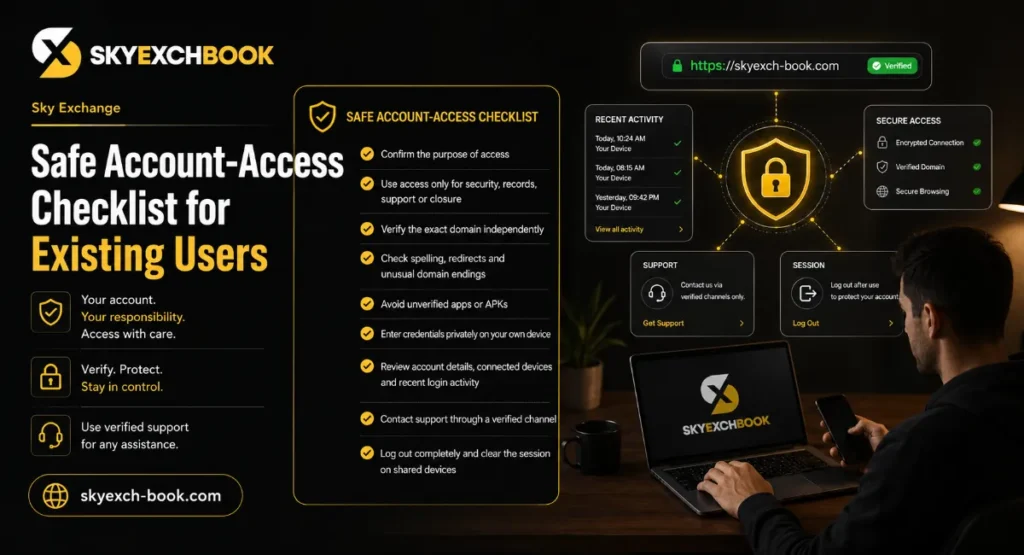
Someone may need account access for a lawful purpose, such as requesting closure, downloading available records, contacting support or reporting unauthorised use. In that situation, follow a cautious process.
- Confirm the purpose of access.
Do not log in to place bets, transfer funds or create a new betting ID. Access only when necessary for security, records, support or account closure. - Verify the exact domain independently.
Do not use a link received from an agent, Telegram group, WhatsApp message, SMS or unknown email. - Inspect the address carefully.
Look for spelling changes, extra hyphens, unusual domain endings and redirected pages. - Avoid unverified applications.
Do not install a file promoted as a sky exchange new app or updated APK unless its legal status, publisher and source can be independently confirmed. - Enter credentials privately.
Use your own device and a trusted internet connection. Avoid public Wi-Fi, cyber cafés and shared computers. - Review security information first.
Check account details, connected devices and recent login activity before taking any other action. - Contact support through a verified channel.
Request written confirmation for account closure, personal-data correction or unauthorised access complaints. - Log out completely.
Remove saved passwords and clear the browser session when the device is shared.
Registration and New-ID Searches Require Extra Caution
Phrases such as sky exchange create id, skyexchange create id, skyexchange id create, sky exchange create account, sky exchange register and skyexchange sign up often indicate that a user wants a new account.
For Indian users in 2026, proceeding with an account designed for online betting or money gaming may conflict with the national prohibition now in force. A person should not rely on claims from an agent saying that the platform is “international,” “private,” “new” or “safe in every state.”
Terms such as sky exchange new id, sky exchange id new, skyexchange new id and skyexchange login new id may also be used by unofficial intermediaries collecting phone numbers, identity documents or payments. Never send Aadhaar images, PAN details, bank information, card numbers, UPI PINs or OTPs to an unknown account seller.
Common Desktop Problems and Practical Fixes
Login Page Does Not Load
The problem may be caused by a poor connection, browser extensions, an expired page or a blocked domain.
Try these basic steps:
- Check whether other trusted websites open normally
- Restart the browser
- Update the browser to its latest stable version
- Disable unnecessary extensions
- Scan the computer for unwanted software
Do not search for a “working mirror” or replacement skyexch id login link. A blocked or unavailable page should not be bypassed.
Page Looks Broken
Clear only the relevant site data, then reload the page. Changing the browser zoom to 100% may also fix misaligned text or buttons.
Password Is Rejected
Use a verified password-reset process only. Never accept password help from a social-media agent who asks for an OTP or remote screen access.
Common Mobile Problems and Practical Fixes
App Will Not Install
An installation error may indicate an incompatible file, an incomplete download or an unsafe APK. Do not disable Android security protections simply to force the installation.
Delete the file when:
- The source cannot be confirmed
- The app asks for unrelated permissions
- The publisher information is missing
- The filename looks altered
- The download arrived through an unknown message
Mobile Login Keeps Refreshing
Check browser updates, cookies, internet stability and battery-saving restrictions. Switching between Wi-Fi and mobile data may identify a connection issue, but it should not be used to bypass legal or network restrictions.
OTP Is Not Arriving
Confirm that the registered number has network coverage and that SMS filtering is not blocking the message. Support staff should never ask you to read an OTP aloud or forward a screenshot.
Account Security Matters on Both Platforms
Desktop and mobile users should follow the same basic security rules:
- Use a unique password that is not used for email or banking
- Never share an OTP, UPI PIN or card PIN
- Turn on additional authentication when legitimately available
- Do not store passwords in shared browsers
- Avoid links that create urgency or promise instant account access
- Review account activity after any suspicious message
- Contact the bank immediately if unauthorised payments appear
CERT-In advises using strong passwords and warns that phishing pages can capture login credentials and OTPs.
Which Device Performs Better for Sky Exchange?
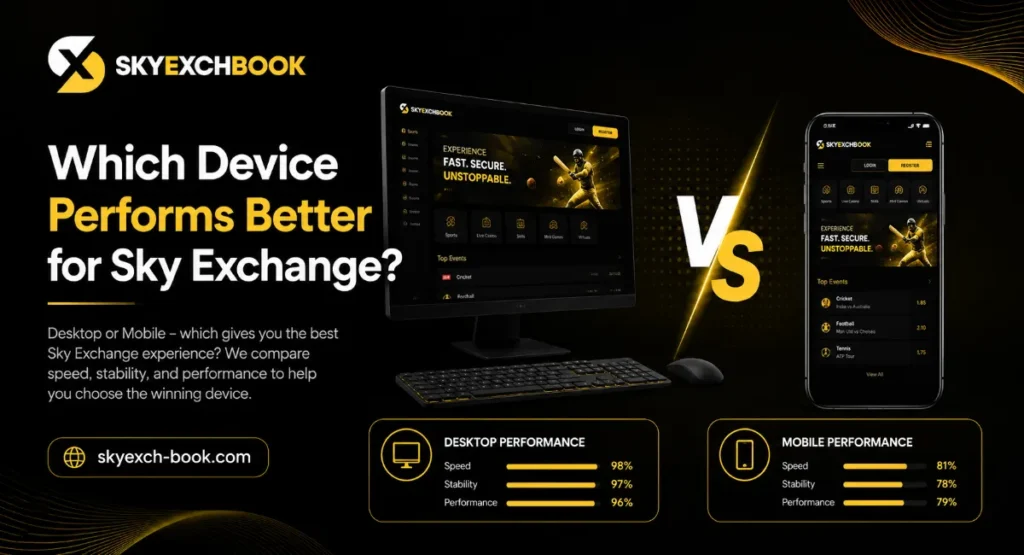
From a purely technical viewpoint, desktop access usually performs better for detailed reading, URL inspection, account review and support communication. Mobile access performs better for portability and quick checks on a personally controlled device.
However, the right answer for Indian readers is not simply “desktop” or “mobile.” The first question is whether the requested service and activity are lawful. A fast website, smooth app or convenient skyexchange new id login does not remove legal, financial or security risks.
For existing-account administration, a trusted desktop browser may provide better visibility. For a brief support response, a secured mobile browser may be more convenient. An unverified APK should not be installed on either basis.
Frequently Asked Questions
1. Is Sky Exchange faster on desktop or mobile?
Desktop may feel more stable because of a larger display, broadband connection and easier navigation. Mobile performance depends heavily on phone quality, browser condition and network strength.
2. Is the Sky Exchange app better than mobile-browser access?
An app may offer direct access, but it also requires installation. A mobile browser avoids APK installation risk. Never install an application unless its publisher, source and legal status can be independently verified.
3. Can Indian users create a Sky Exchange new ID in 2026?
Indian users should not create an account for prohibited online money gaming. The national online-gaming law effective from 1 May 2026 prohibits online money gaming services, related advertising and payment facilitation.
4. Why do I see different Sky Exchange login websites?
Different results may be unrelated pages, imitation domains, agent-operated links or outdated addresses. Similar logos and names do not confirm authenticity.
5. Should I use a shared computer for skyexchange login?
No. A shared computer may retain passwords, cookies, screenshots or browsing records. Use a personally controlled device for legitimate account-security or support purposes.
6. What should I do if a Sky Exchange support agent asks for my OTP?
Do not share it. End the conversation and contact your bank if financial information has already been exposed. An OTP can be used to take control of an account or approve a transaction.
7. Can gaming be treated as a regular source of income?
No. Gaming and betting should never be treated as guaranteed income. Do not borrow money, chase losses or exceed personal spending and time limits. Adults should also consider legal restrictions before accessing any money-based service.
Visit the Official Sky Exchange – Fast, Secure & Trusted Access
Choose Safety Before Screen Size
Desktop offers the stronger overall layout, while mobile offers greater convenience. Yet performance should never be judged only by loading speed or ease of login. Indian users researching Sky Exchange should first examine the current law, confirm the purpose of any account access and protect themselves from fake pages, APK files and account sellers.
For lawful account administration, use a trusted personal device, verify every link, keep OTPs private and contact verified support for closure or security concerns. Do not create a new betting ID, deposit funds or treat gaming as an income opportunity. The safest platform is the one that protects your device, personal information, money and legal position.
Author